

Home > PSD2 Information
PSD2 Information
PSD2 Information
FirstBank's APIs
Applying to use our APIs
Before starting your application to access and use our APIs, please ensure that you are registered with the Financial Conduct Authority (FCA) as an Account Information Service Provider (AISP) and/or Payment Initiation Service Provider (PISP).
To express your interest in using our APIs, please contact [email protected] and provide details of your FCA registration.
We will then contact you to progress your application.
What we Provide
In accordance with the Payment Services Directive 2 (PSD2), we currently provide access to a Sandbox environment. The Sandbox returns mocked responses for each of the APIs we have made available, allowing you to test that your API calls receive the documented response. The Sandbox is not transactional.
We are working to provide access to the live banking system in line with the PSD2 directive.
Onboarding
Once your application to use our APIs has been accepted by the bank, we will:
- create an Application Developer account for your organisation;
- provide access to your application key; and
- give you access to our API Catalogue in our Developer Portal, hosted on Oracle Cloud.
You will be provided with login credentials to access our Developer API Portal, where you can view the API Catalogue for the APIs relevant to your FCA registration.
The API Catalogue provides access to the documentation for each API we make available.
You will receive an email with your username after we have onboarded you to our API platform. You can find your application key by viewing My Applications in the Developer Portal.
Authentication
Our APIs are protected by OAuth 2.0 security. We will provide details of the process to be followed for security and authentication.
The OAuth policy attached to our APIs asserts the JSON Web Token (JWT) access token and validates various standard claims as defined in RFC7519. For more information about the JWT specification, see https://tools.ietf.org/html/rfc7519#section-4.1
We require that the JWT token is signed using compact serialization format. For more information, see https://tools.ietf.org/html/rfc7515#section-3.
The JWT must have the following characteristics:
- it must contain an issuer (iss) claim;
- it must contain an audience (aud) claim;
- it must contain an issued time and expiry time;
- it should be digitally signed to help protect the integrity of the message and is expected to be signed asymmetrically;
- the scope must be defined in the JWT as scope.
Using our Developer API Portal
Access our Developer API Portal using the below button.
Enter the username and temporary password provided in the Welcome to Oracle Cloud email. You will then be asked to update your password and proceed to the Developer API Portal using your latest credentials.

After logging in, you will see three main options at the top right of the page.

By default, the API Catalogue is displayed, showing all APIs you have access to.
Click My Applications to view the applications assigned to your organisation. Typically, there will only be one application per organisation.
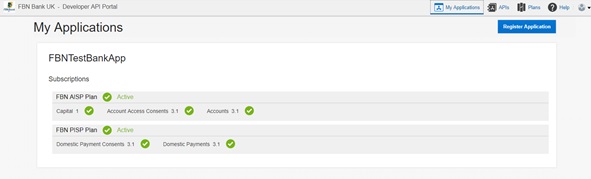
Within My Applications, click on the application name to view further information, including:
- Overview – where you can obtain the application key value that must be passed in the HTTP header app-key
- Subscriptions – shows the plans your application can access and the API endpoints for Sandbox and Production
- Grants – shows who at the bank manages your application
- Analytics – allows you to view usage analytics for each API your application is entitled to use
The APIs page provides a list of each API available to your organisation.
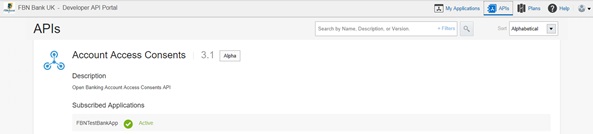
Click on an API name to view:
- Documentation – detailed information about the API, including the option to test the mock service before interacting with the API once the authentication flow has been implemented
- Plans – the plan that includes that API
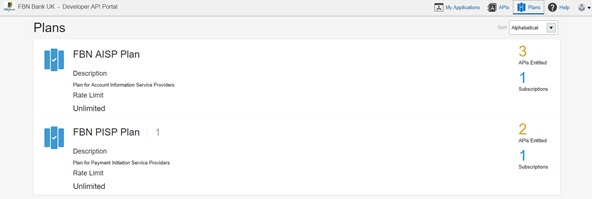
The Plans page provides:
- a list of the plans your organisation is currently entitled to use
- the APIs included in each plan
- any specific quota restrictions that apply
Calling our APIs
You can find the Sandbox API endpoints for our APIs in the API Catalogue within the Developer Portal.
To call an API, you must:
- send a valid OAuth token in the Authorization HTTP header; and
- send the application key for your designated application in a custom HTTP header named app-key
Our production API endpoints will also be shown in the Developer Portal in line with the PSD2 implementation schedule.